
Luckyrollers App — Download for Android, iOS and Desktop
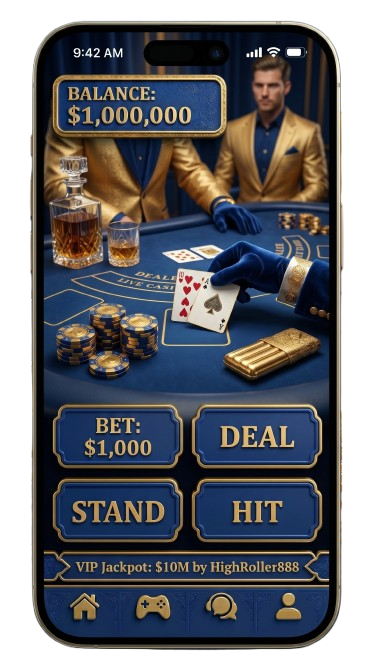
The Luckyrollers Casino does not offer a native app through the Google Play Store or Apple App Store — instead, UK players access the platform via an Android APK download or a Progressive Web App (PWA) installed through Safari on iOS. Android users download the APK directly from the official Luckyrollers website, while iOS users add the PWA to their Home Screen via Safari in seconds. Desktop players on Windows and macOS can install the PWA through Chrome for a near-native experience. Start mobile gaming at Luckyrollers today and get the full casino in your pocket.
Platform | Method | Store Available | Min. Version |
Android | APK download | No | Android 8.0+ |
iOS | Safari PWA | No | iOS 14+ |
Windows | Chrome/Edge PWA | No | Windows 10+ |
macOS | Chrome PWA | No | macOS 10.15+ |
How to Log In to Your Account
Logging in to the Luckyrollers app requires your registered email address and password. The "Log In" button sits in the top-right corner of the screen on both mobile and desktop layouts. Once tapped, enter your credentials and you are inside your account within seconds.
- Open the Luckyrollers mobile online site or installed PWA/APK.
- Tap "Log In" in the top-right corner.
- Enter your registered email address.
- Enter your password.
- Tap "Confirm" to access your account.
- Enable biometric login (Face ID / fingerprint) on supported devices for faster future access.
Luckyrollers Casino App — Native or Progressive Web App
The Lucky Rollers Casino application is a Progressive Web App, not a native application — there is no binary downloaded from a curated store on iOS or desktop. Android is the one exception: Luckyrollers distributes a true APK file, which installs as a standalone app icon on your home screen and behaves identically to a native app. The PWA technology used on iOS and desktop runs entirely inside the browser engine, meaning no App Store approval cycle is needed and updates deploy instantly server-side.
What this means in practice for UK players:
- No waiting for store review — new games and features go live immediately.
- No storage bloat — the PWA caches only what you use.
- Full access to payments, live casino, and account management without a dedicated binary.
- Android APK users get an experience nearly identical to a native app, including offline splash screen.
Feature | PWA (iOS / Desktop) | APK (Android) |
Installation source | Browser (Safari / Chrome) | Official website direct download |
App Store required | No | No |
Automatic updates | Yes, server-side | Manual re-download or in-app prompt |
Offline functionality | Limited (cached shell) | Cached shell + faster reload |
Push notifications | iOS 16.4+ only | Yes, full support |
Storage footprint | ~100–200 MB | ~80–120 MB |
Download Process Across All Platforms
The setup path differs depending on your device — Android users sideload an APK, iOS users save a PWA through Safari, and Windows or macOS users install via Chrome or Edge. Each route takes under three minutes from start to first spin.
- Android — Download APK from the official Luckyrollers website and install.
- iOS — Open Safari, visit Luckyrollers, tap Share → "Add to Home Screen".
- Desktop (Windows/macOS) — Open Chrome, visit Luckyrollers, click the install icon in the address bar.
Lucky Rollers Android APK Download and Installation
Google Play prohibits offshore real-money casino apps, which is why the Lucky Rollers app is distributed as a direct APK from the official Luckyrollers website rather than through the store. The APK file weighs approximately 80–120 MB. Download only from the official Luckyrollers website — third-party mirrors are not endorsed and carry security risks. If you wish, scan the APK with antivirus software before installation.
- On your Android device, go to Settings → Security → enable "Install unknown apps" for your browser.
- Open the official Luckyrollers website in your mobile browser.
- Tap the Android download banner and save the APK file.
- Open your Downloads folder and tap the APK file.
- Tap "Install" and wait for completion (~30 seconds).
- Launch the Luckyrollers Casino app from your home screen.
Adding Progressive Web App to Your iOS Home Screen
Apple's App Store guidelines block real-money gambling apps for offshore operators in the UK, so the Lucky Rollers online mobile version on iOS is delivered as a PWA. It requires iOS 14 or later and works exclusively through Safari — Chrome and Firefox on iOS do not support the "Add to Home Screen" PWA installation and must not be used for this process. Push notifications are available from iOS 16.4 onwards; on older devices the casino Luckyrollers mobile app runs normally but without real-time alerts. The installed PWA uses approximately 100–200 MB of device storage.
- Open Safari (not Chrome or Firefox) on your iPhone or iPad.
- Navigate to the official Luckyrollers website.
- Tap the Share icon (box with arrow) at the bottom of Safari.
- Select "Add to Home Screen" from the share sheet.
- Confirm the name and tap "Add".
- Launch the icon from your Home Screen to begin playing.
Luckyrollers Mobile Online — Windows and macOS Desktop Setup
The Luckyrollers mobile online experience extends to desktop via a Chrome PWA, which works identically on Windows 10/11 and macOS 10.15 Catalina or later. On Windows, Microsoft Edge is a reliable alternative if Chrome is unavailable. Two known friction points exist: on Windows 11, Smart App Control may block installation — resolve this by going to Windows Security → App and browser control → Smart App Control → set to Warn. On macOS, if the install icon does not appear in Chrome's address bar, clear the browser cache, then reload the site.
- Open Google Chrome (or Edge on Windows) and visit the official Luckyrollers website.
- Look for the install icon (monitor with arrow) in the Chrome address bar.
- Click "Install" in the confirmation dialogue.
- The casino Lucky Rollers app shortcut will appear on your desktop or taskbar.
- Launch it for a full-screen, browser-chrome-free experience.
Full Feature Comparison on Mobile Devices
The Luckyrollers app delivers the complete desktop feature set on mobile — no content is locked behind a desktop-only gate. The game library, live casino tables, payment options, and responsible gambling tools are all fully accessible from any supported mobile device.
Feature | Detail |
Game Library | 3,000+ titles across slots, table games, and crash games |
Live Casino | 150+ live tables from Evolution, Pragmatic Play Live, and Ezugi |
Payments | Visa, Mastercard, PayPal, Skrill, Neteller, Bitcoin, Ethereum, Litecoin, USDT |
Security | 256-bit SSL encryption; RNG certified by iTech Labs |
Responsible Gambling | Deposit limits, session timers, self-exclusion (GamStop compatible) |
Performance | 60 fps gameplay on mid-range devices; average load time under 2 seconds |
User Interface | Available in English; adaptive layout for screens from 4" to 13" |
casino Luckyrollers Mobile App — Top Game Selection
Every major game category available on desktop loads without compromise on the casino Luckyrollers mobile app. The touch-optimised interface makes navigating between slots, live tables, and crash games effortless on any screen size.
- Slots — "Gates of Olympus" by Pragmatic Play
- Live Blackjack — "Infinite Blackjack" by Evolution
- Live Roulette — "Lightning Roulette" by Evolution
- Crash Games — "Aviator" by Spribe
- Table Games — "Speed Baccarat A" by Evolution
Comparing Installation Methods and Performance
Both the APK and the PWA provide access to the full Luckyrollers game library — the difference between them is operational, not functional.
Criteria | Android APK | PWA (iOS / Desktop) |
Installation time | ~2 minutes | ~30 seconds |
Update method | Manual re-download prompt | Automatic (server-side) |
Push notifications | Full support | iOS 16.4+ only |
Storage used | ~80–120 MB | ~100–200 MB |
Offline shell | Yes | Partial |
Performance (fps) | 60 fps | 60 fps |
UK players on Android who want push notifications and a faster cold-start time will find the APK the more capable route; iOS and desktop users get a seamless experience with zero manual update effort through the PWA.
Lucky Rollers App Mobile Security Standards
The Lucky Rollers app applies the same security infrastructure used by regulated financial platforms. Every session and transaction is protected end-to-end, regardless of whether you access via APK or PWA.
- 256-bit SSL encryption covers all data in transit, including payment requests and account data.
- Payments via Visa, Mastercard, PayPal, Skrill, Neteller, and crypto (Bitcoin, Ethereum, USDT) are processed through a PCI-DSS-compliant mobile gateway.
- Biometric authentication (Face ID and fingerprint) is supported on compatible Android and iOS devices for login.
- RNG fairness is certified by iTech Labs, with all results independently audited.
Installation Issues and Quick Solutions
Most problems with the Luckyrollers download app can be resolved in 2–3 steps without contacting support.
Issue | Platform | Cause | Fix |
APK install blocked | Android | "Unknown sources" disabled | Settings → Security → enable "Install unknown apps" |
"Add to Home Screen" missing | iOS | Using Chrome or Firefox instead of Safari | Switch to Safari and repeat the process |
Install icon absent in Chrome | macOS | Cached outdated site data | Clear Chrome cache → reload the Luckyrollers site |
PWA blocked on install | Windows 11 | Smart App Control active | Windows Security → App and browser control → Smart App Control → Warn |
App won't open after install | Android / iOS | Corrupted cache or outdated OS | Clear app cache or update OS to the minimum required version |
Login page not loading | All platforms | Poor connection or DNS issue | Switch to a different network or enable VPN, then reload |
FAQ
Is the Luckyrollers download app free to download?
Can I play real-money games on the mobile app?
Why isn't the Lucky Rollers online mobile version available on app stores?
Does the app support Face ID or biometric login?
How much storage does the casino Luckyrollers mobile app use?
What should I do if the app won't open?